Here’s a breakdown of the process:
- Registering on an exchange
- Making a deposit
- Purchasing coins
- Holding
- Selling coins
1. Registering on an Exchange
Let’s go into detail—this is the foundation of everything that follows. We can even walk you through the process together, if needed.
To make a deposit, you’ll need an exchange wallet—think of it as a specialized banking app with its own “SWIFT-like” network for moving funds. Exchange wallets are hosted directly by the platforms themselves, but that doesn’t mean you can’t move your funds between different exchanges; transfers are straightforward.
Based on our experience, we recommend sticking to a short list of reliable exchanges:
To make a deposit, you’ll need an exchange wallet—think of it as a specialized banking app with its own “SWIFT-like” network for moving funds. Exchange wallets are hosted directly by the platforms themselves, but that doesn’t mean you can’t move your funds between different exchanges; transfers are straightforward.
Based on our experience, we recommend sticking to a short list of reliable exchanges:
You must use referral links only! Only by using referral links will you get a lower trading commission, which is crucial for your trading strategy since you’ll be trading on spot for a long time.
So, be sure to register on these three exchanges using the provided links. During registration, there is NO need to complete verification. All you need is an active email (which only YOU can access), a phone number (only YOU should have access to it, and it should NOT be found in public phone number databases), and an authenticator app installed on your device.
Registration on exchanges is always the same, so we’ll walk through the first exchange on the list – Mexc.
On the exchange’s homepage, you’ll see a blue “Login/Sign up” button in the upper right. Click it and you’ll see a pop-up window.
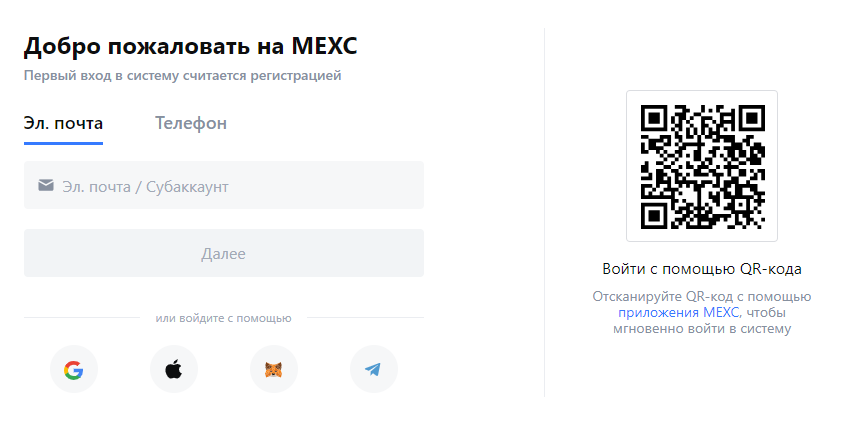
NEVER log in to the exchange using Google, Apple, Metamask, or Telegram.
This is absolutely mandatory; otherwise, you risk losing all your assets.
This is absolutely mandatory; otherwise, you risk losing all your assets.
Enter your phone or email. I recommend starting with email. For the email, here are the options:
Ideally, use Gmail, for security reasons. If you don’t have one, create it. Gmail is preferred because exchanges are more loyal to Gmail in case of unforeseen situations, and Gmail itself is more secure than its competitors. There’s also ZohoMail—a fully functional alternative to Gmail. We consider it suitable because, since Gmail is so popular, there’s a higher risk of your email being found in leaked databases, while less popular options (like India-based ZohoMail) are less likely targets. India’s political neutrality is also a factor. Gmail is a US company and, if “black crypto” is investigated, Gmail data will be handed over to US authorities immediately. India could also cooperate, but is less obliged to do so. This guide is written for our audience, and these geopolitical factors matter.
Ideally, use Gmail, for security reasons. If you don’t have one, create it. Gmail is preferred because exchanges are more loyal to Gmail in case of unforeseen situations, and Gmail itself is more secure than its competitors. There’s also ZohoMail—a fully functional alternative to Gmail. We consider it suitable because, since Gmail is so popular, there’s a higher risk of your email being found in leaked databases, while less popular options (like India-based ZohoMail) are less likely targets. India’s political neutrality is also a factor. Gmail is a US company and, if “black crypto” is investigated, Gmail data will be handed over to US authorities immediately. India could also cooperate, but is less obliged to do so. This guide is written for our audience, and these geopolitical factors matter.
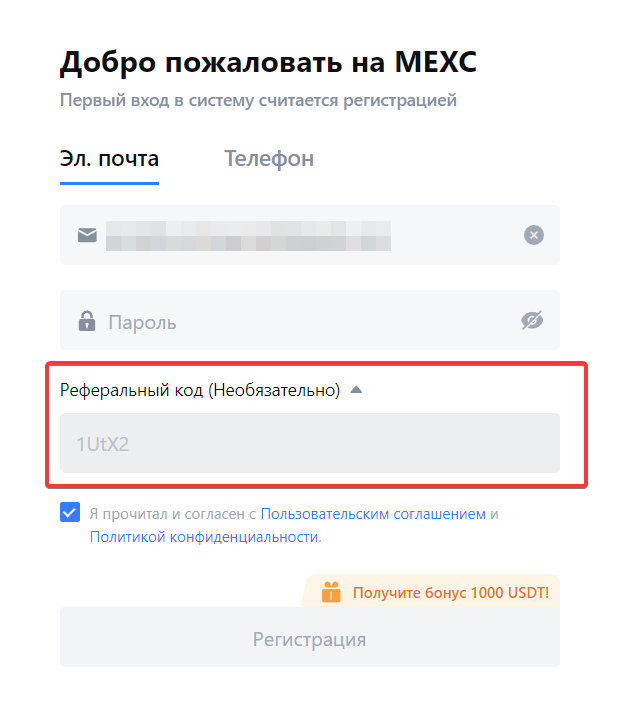
Enter your email and make sure there is a referral code. Without it, the exchange will charge a significant fee, which does not suit our financial model.
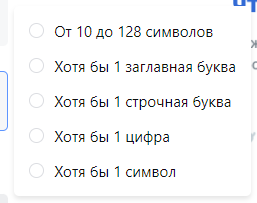
Next, create a password. Use a combination of special characters, upper and lower case letters, etc., as per the standard.
Once registration is complete, on the main (and any) page of the exchange you’ll see a “Wallet” tab. That’s your exchange wallet—what you need. Click it.
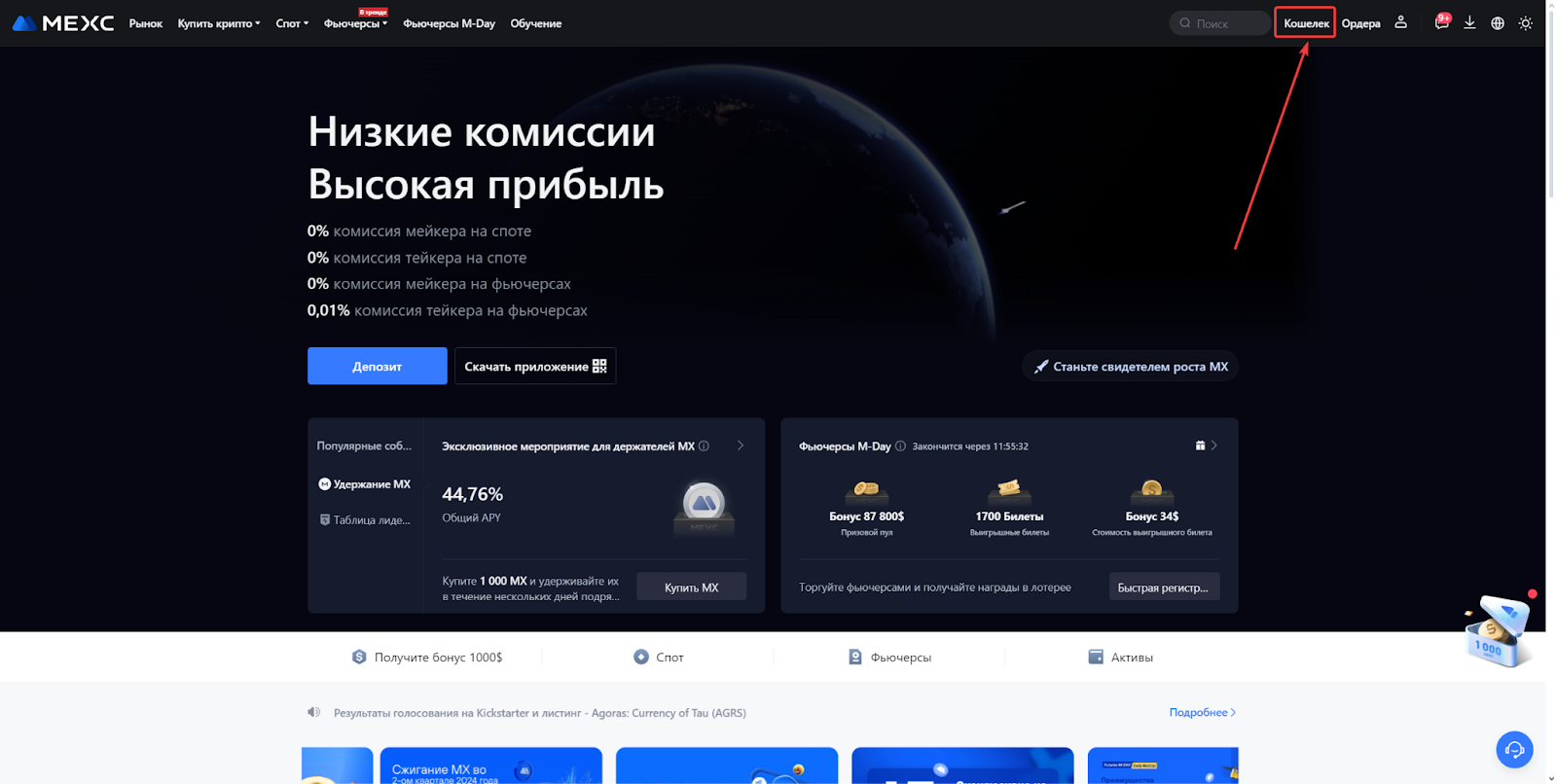
You’re interested in the menu shown in the screenshot below, specifically the two main buttons: “Deposit” and “Withdraw.”
Basically, you’re now in your exchange wallet, which you can receive and send funds from. To top up your wallet, use the “Deposit” button; to withdraw, use “Withdraw.”
To find your wallet address and top up, click “Deposit” and you’ll see the following menu:
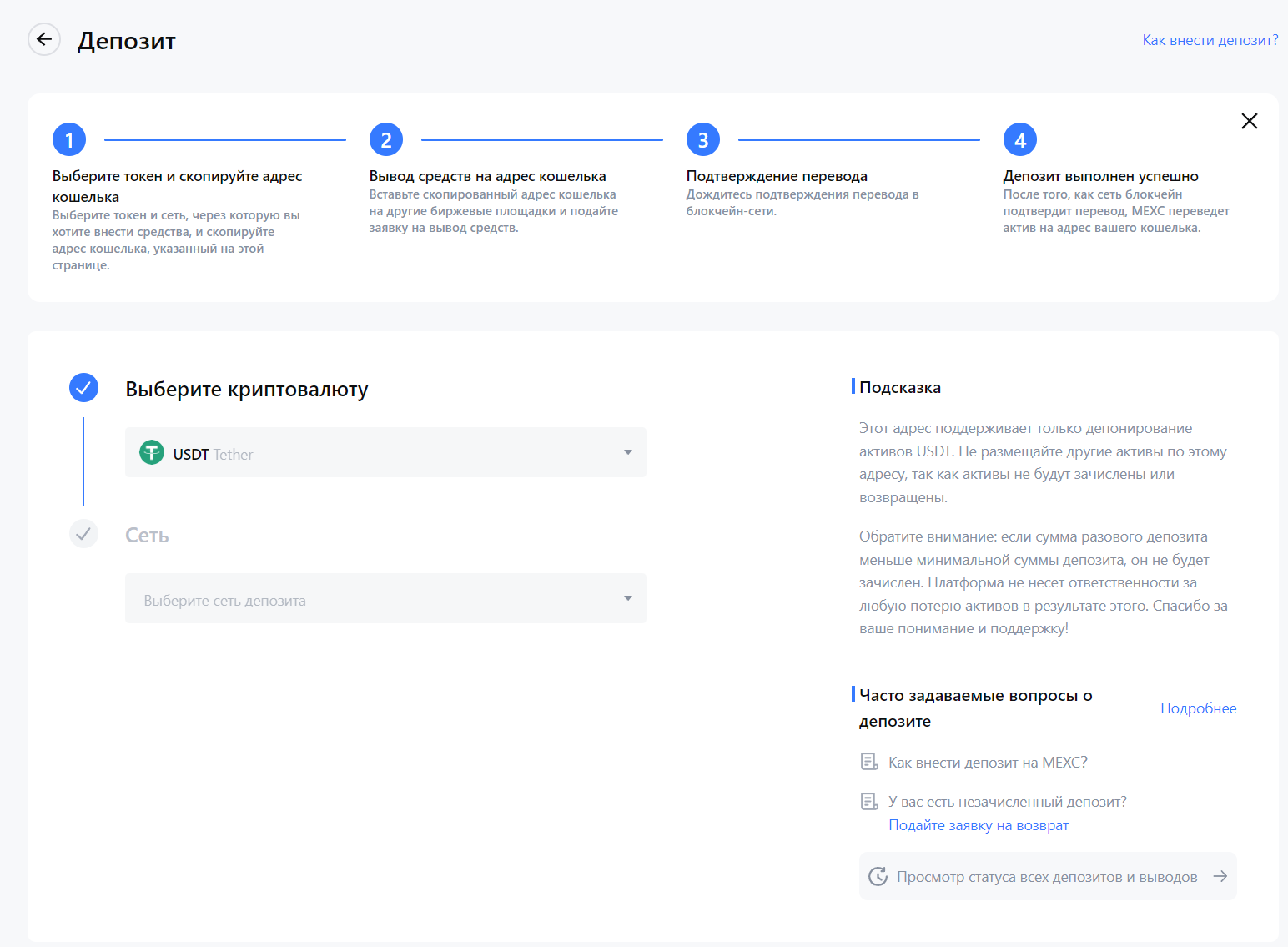
Choose the cryptocurrency you want to deposit. In most cases, it’ll be USDT, less often BTC, ETH, or other altcoins. In my screenshot above, USDT is selected by default.
Let’s move to the second field—“Network.” The “network” of a cryptocurrency is a complex topic, but simply put, it’s the underlying blockchain for that token.
For USDT, most users use the TRC20 network, less often ERC20 and BEP20, and rarely others. Choose “TRC20” and get your wallet address.
For USDT, most users use the TRC20 network, less often ERC20 and BEP20, and rarely others. Choose “TRC20” and get your wallet address.
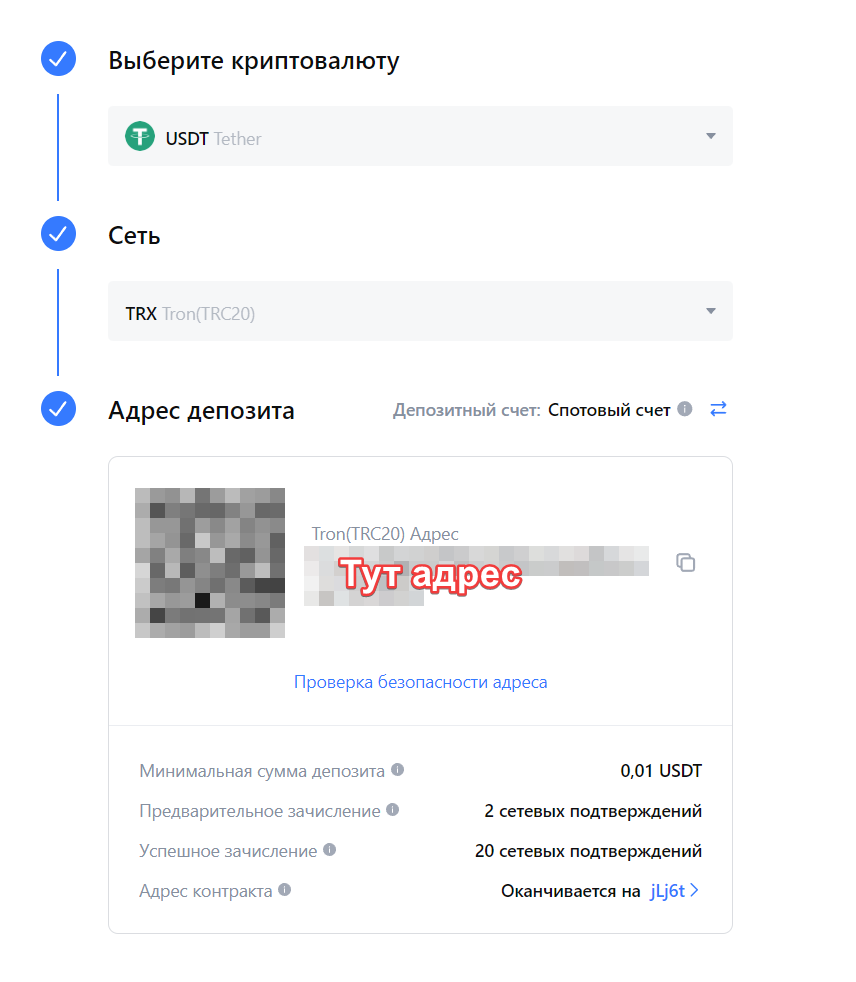
Double-check all details and make sure you have selected the right cryptocurrency (for most, it’s USDT) and the correct network (TRC20).
If you try to receive USDT TRC20 to an ERC20 address, your tokens will be lost forever. Think of it like this: you have Tinkoff and Sberbank cards. If you send money from Tinkoff to a Sberbank card number, the funds won’t arrive. Crypto networks work the same way. Always check the details carefully.
To withdraw to another exchange or wallet, simply paste the wallet address where you want to send the funds and select the network accordingly.
Also, download the official app for the exchange to your smartphone, so you always have access and can react quickly to any signal.
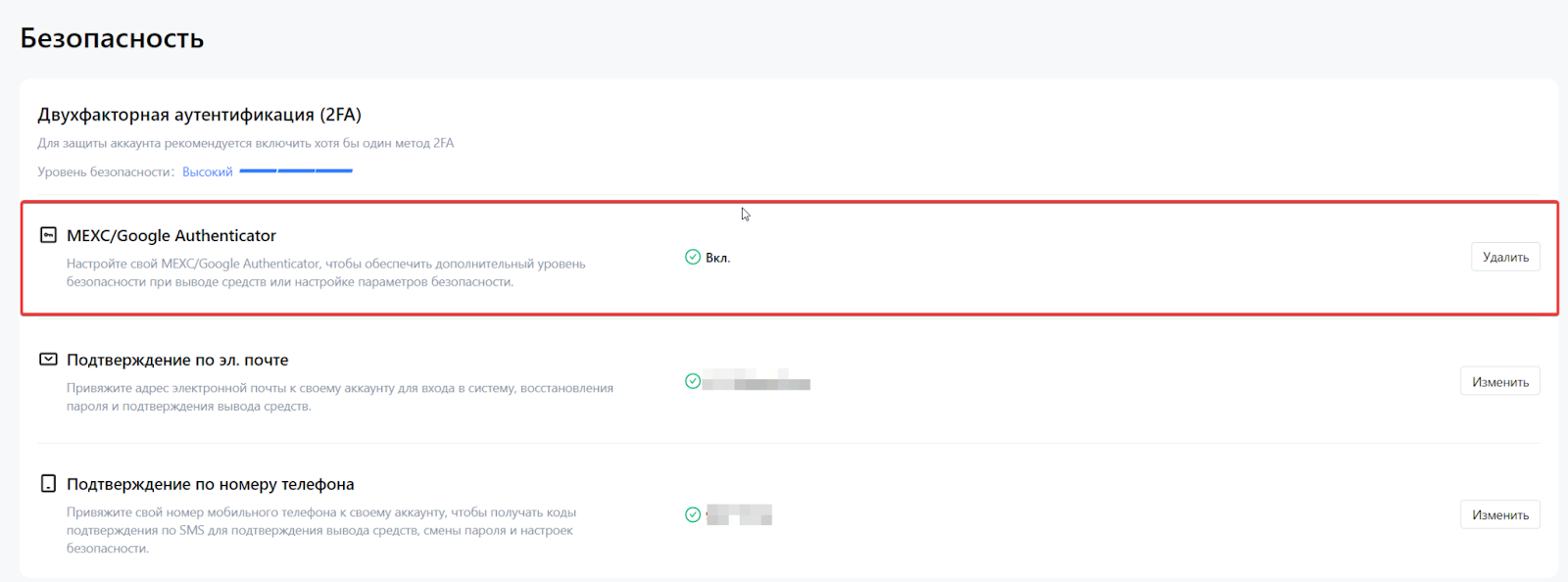
To fully secure your account, go to your user icon in the upper right corner and select “Security.”
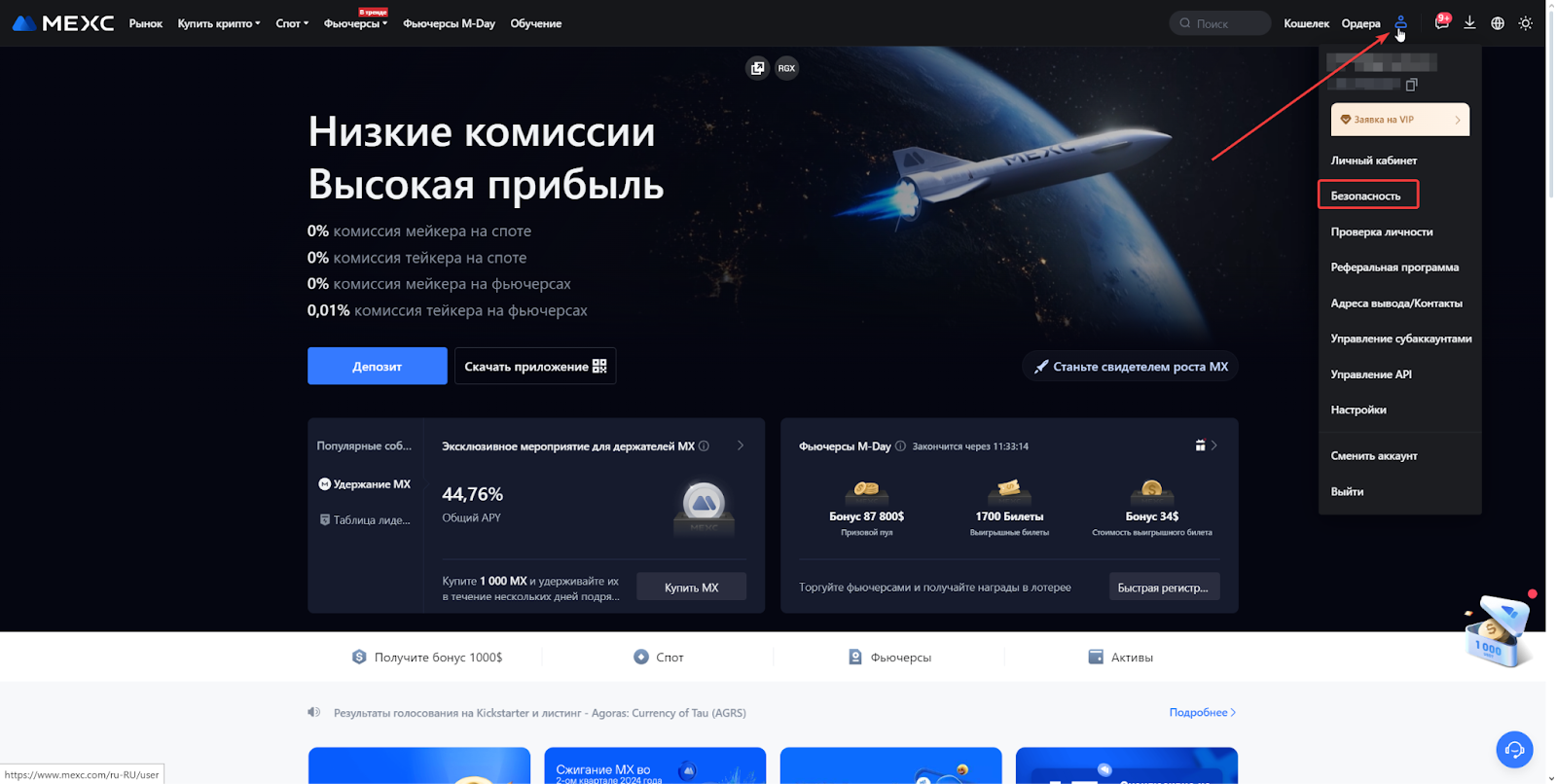
Check that “Email verification” is enabled and connect “MEXC/Google Authenticator.”
Be sure to download Google Authenticator to your phone and set it up as instructed. You’ll use this app on other exchanges (Kucoin, BingX) later.
That’s it for exchange wallets. For now, that’s enough.
2. Cryptocurrency Deposit
At this point, you should have accounts on three exchanges. You have two options: deposit by card or deposit by cash.
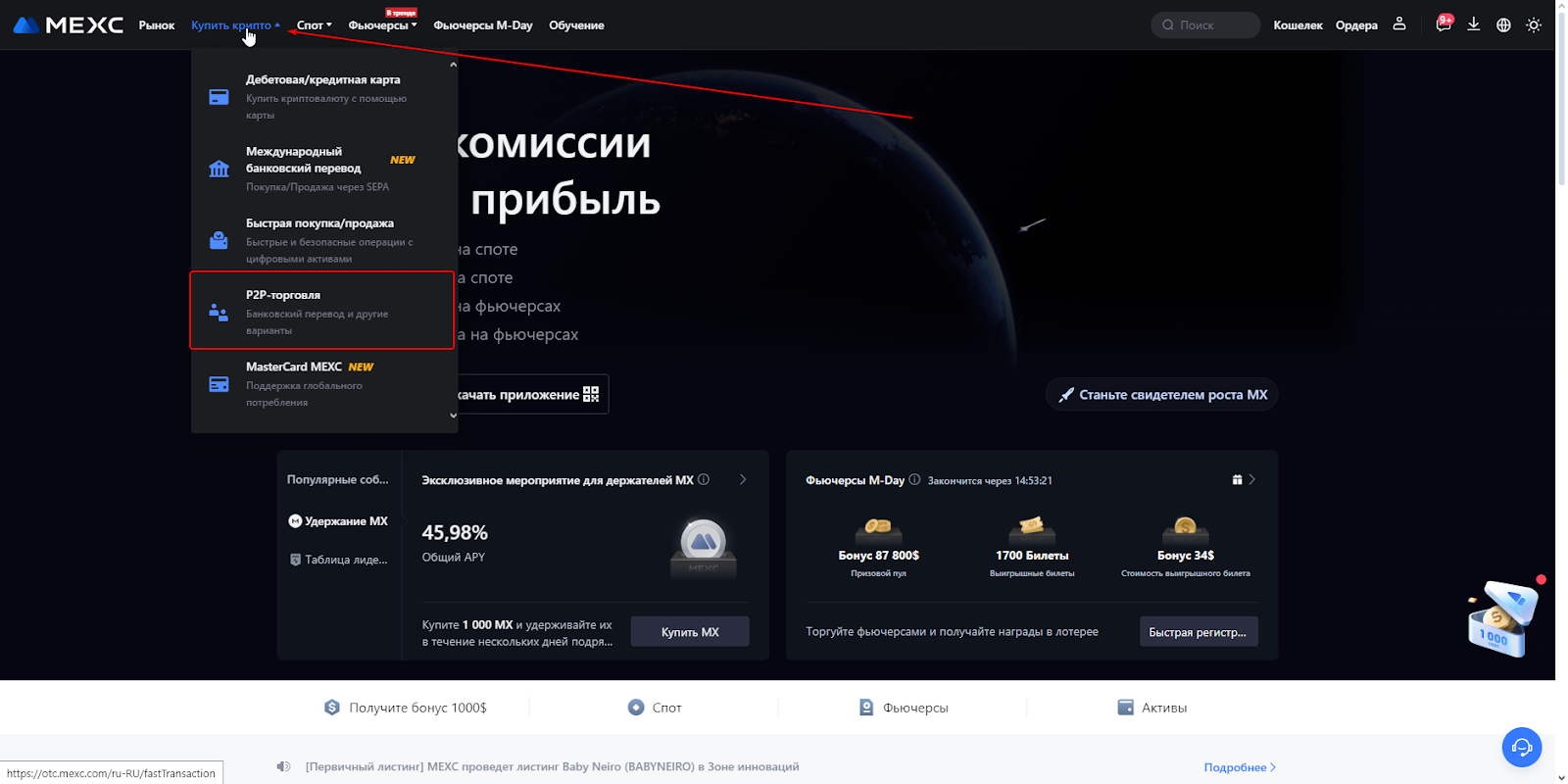
To buy cryptocurrency with a bank card, it’s much more cost-effective to use the exchange’s P2P platform. On the main page, hover over “Buy Crypto” and select “P2P trading.”
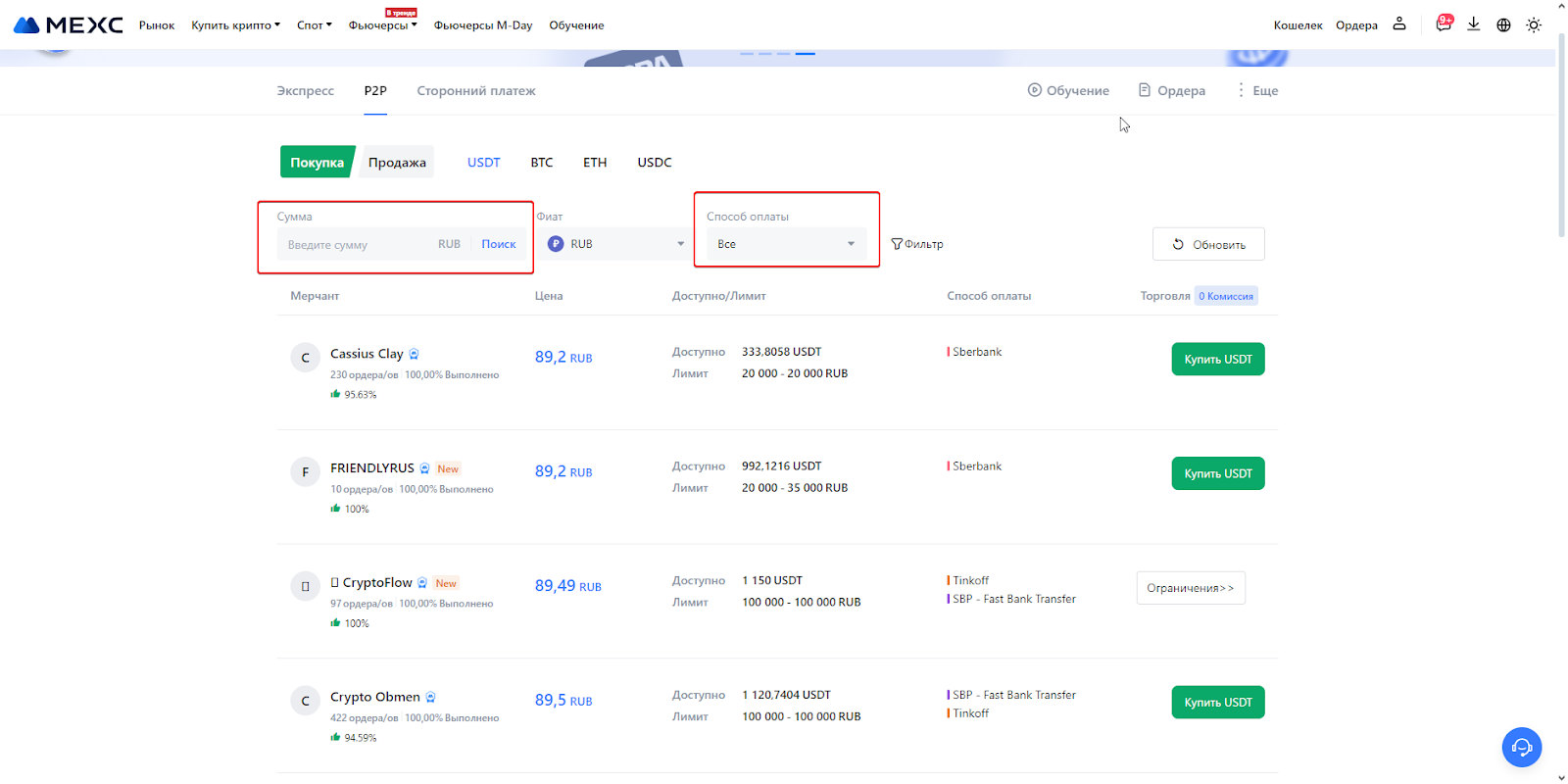
You’ll see the P2P trading page. Use the filters as needed. Enter the amount you want to convert into crypto and select the bank you’ll send funds from.
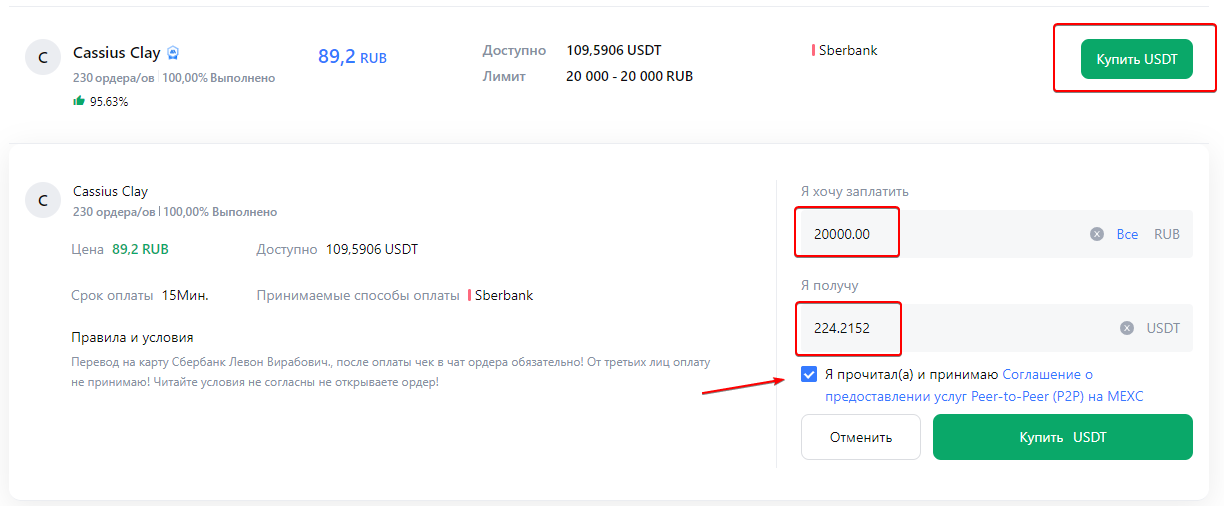
When you’ve chosen a seller, click the green button, re-enter your amount, receive the USDT calculation, check the box, and click “Buy USDT.”
You’ll see the order window, which shows the payment details and the amount you entered earlier. Transfer the funds and click “I paid.”
You must pay within 15 minutes—if you don’t make it in time, contact the seller in chat or restart the operation.
You must pay within 15 minutes—if you don’t make it in time, contact the seller in chat or restart the operation.
After payment, the seller has 15 minutes to send you the USDT. If the time expires and you haven’t received your USDT, don’t worry—contact the seller in chat. If there’s no response, you can appeal and the exchange will intervene and may force the transfer of USDT to you.
That’s basically it. Note: you can only cancel three P2P orders per day at your own initiative, so be careful.
Now let’s cover cash deposits. If you want to exchange cash for cryptocurrency:
- Exchange rates change every second. Fix the rate—the rate is locked for 30 or 60 minutes. If you don’t make it in time, it might change.
- In Moscow, exchanges usually happen in “Moscow City” buildings.
- Exchange commission is 2–5%, depending on amount and quality/year of bills.
- The rate on an exchanger’s website is often not real—exchangers use bots to constantly update rates and undercut competitors, so the best rate is always changing. Rates are usually recalculated in real time, after you hand over your money. There’s not much you can do about this as a user, which is why we recommend exchanging through us—we have trusted partners and understand how they work.
So, the exchange process is as follows:
- You tell us the amount you want to exchange and give your wallet address.
- We find the best rates, check exchangers, and make arrangements.
- We give you the address to go to, and other instructions.
- You meet the contact, hand over the cash, and check your wallet.
3. Buying Coins
The last and easiest step is buying coins. Go to the “Spot” section.
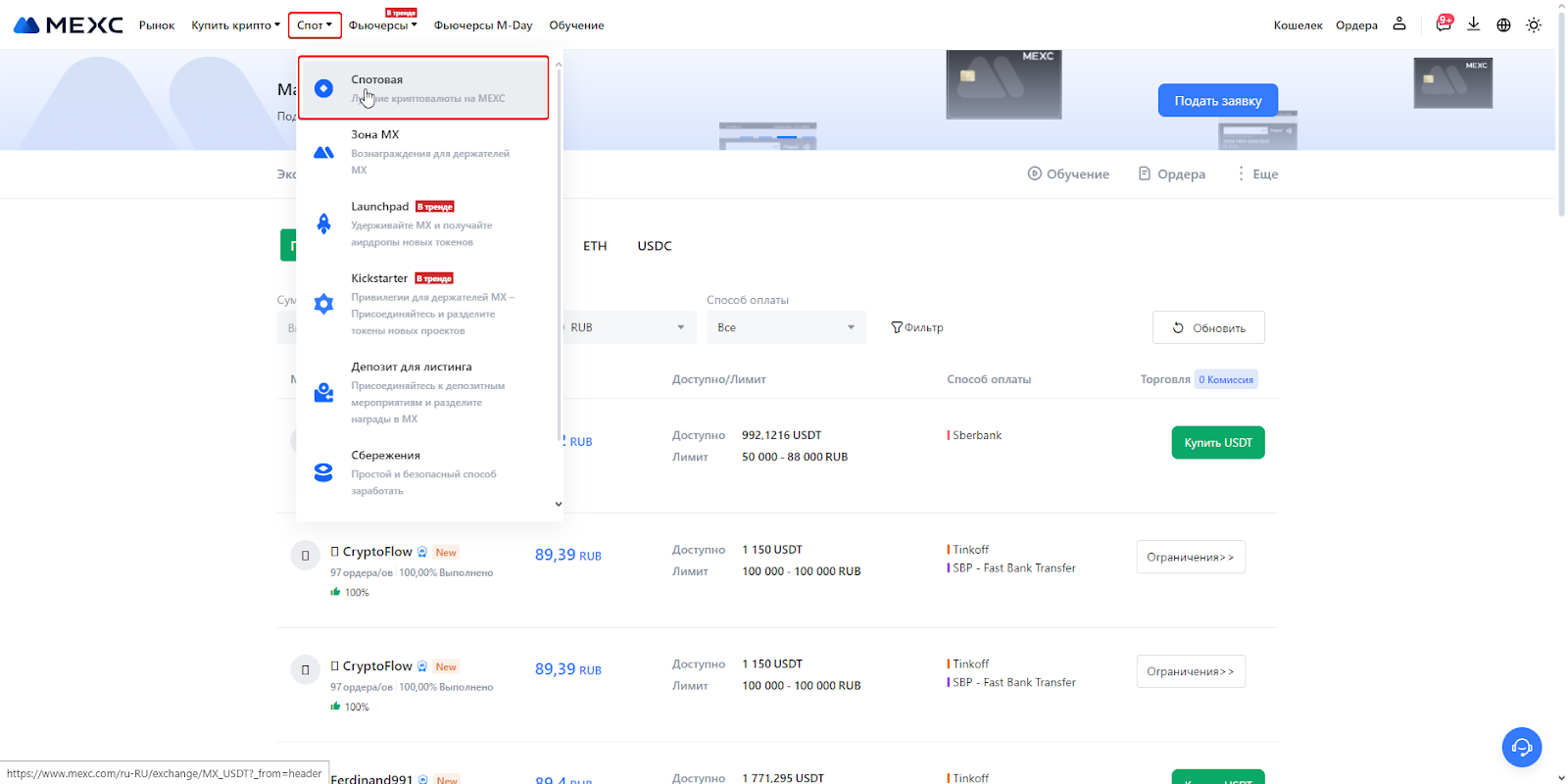
You’ll see a window like this.
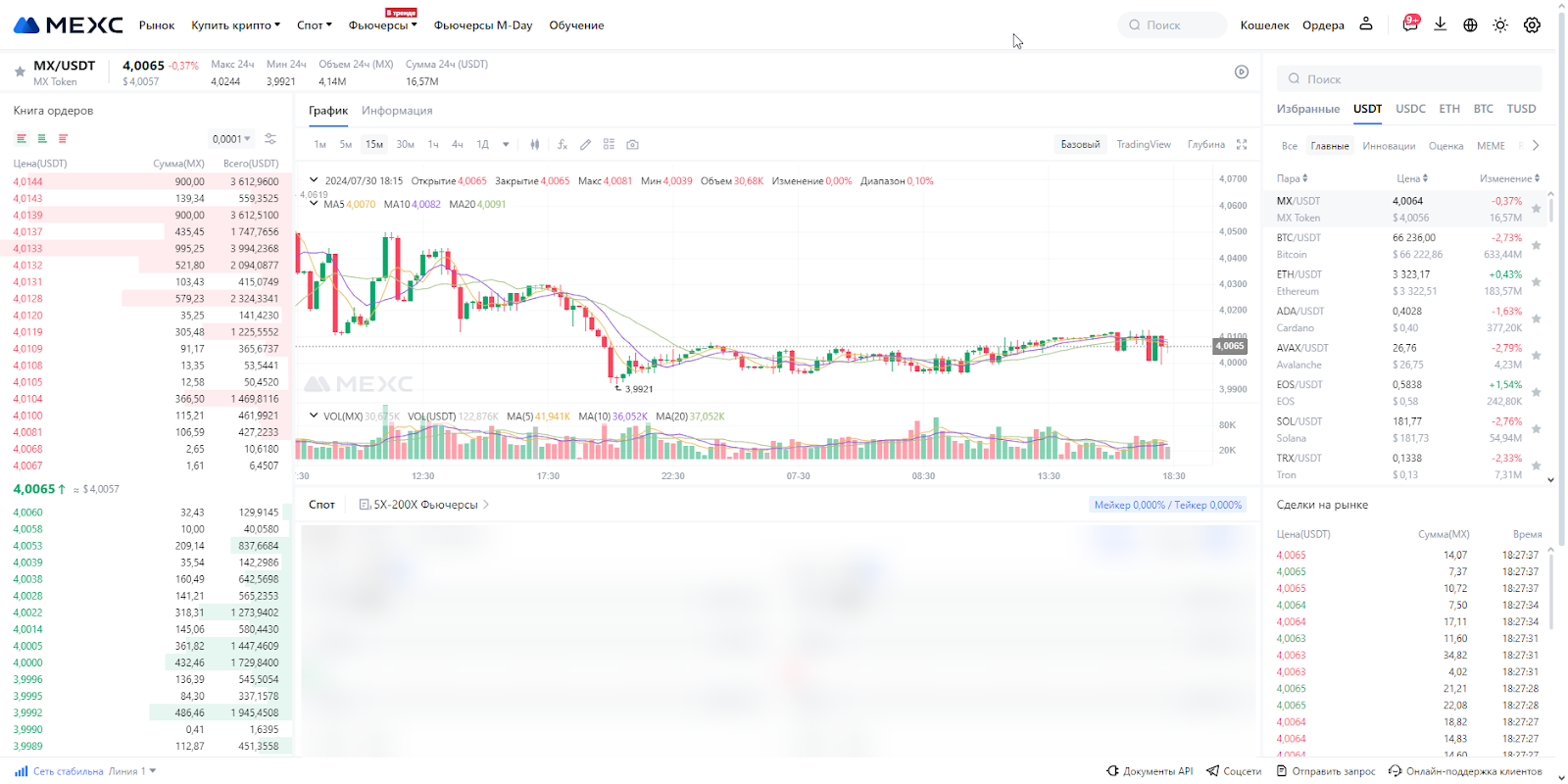
On the right, there’s a search for popular coins. Make sure USDT is selected—it’s the “crypto dollar” everyone uses.
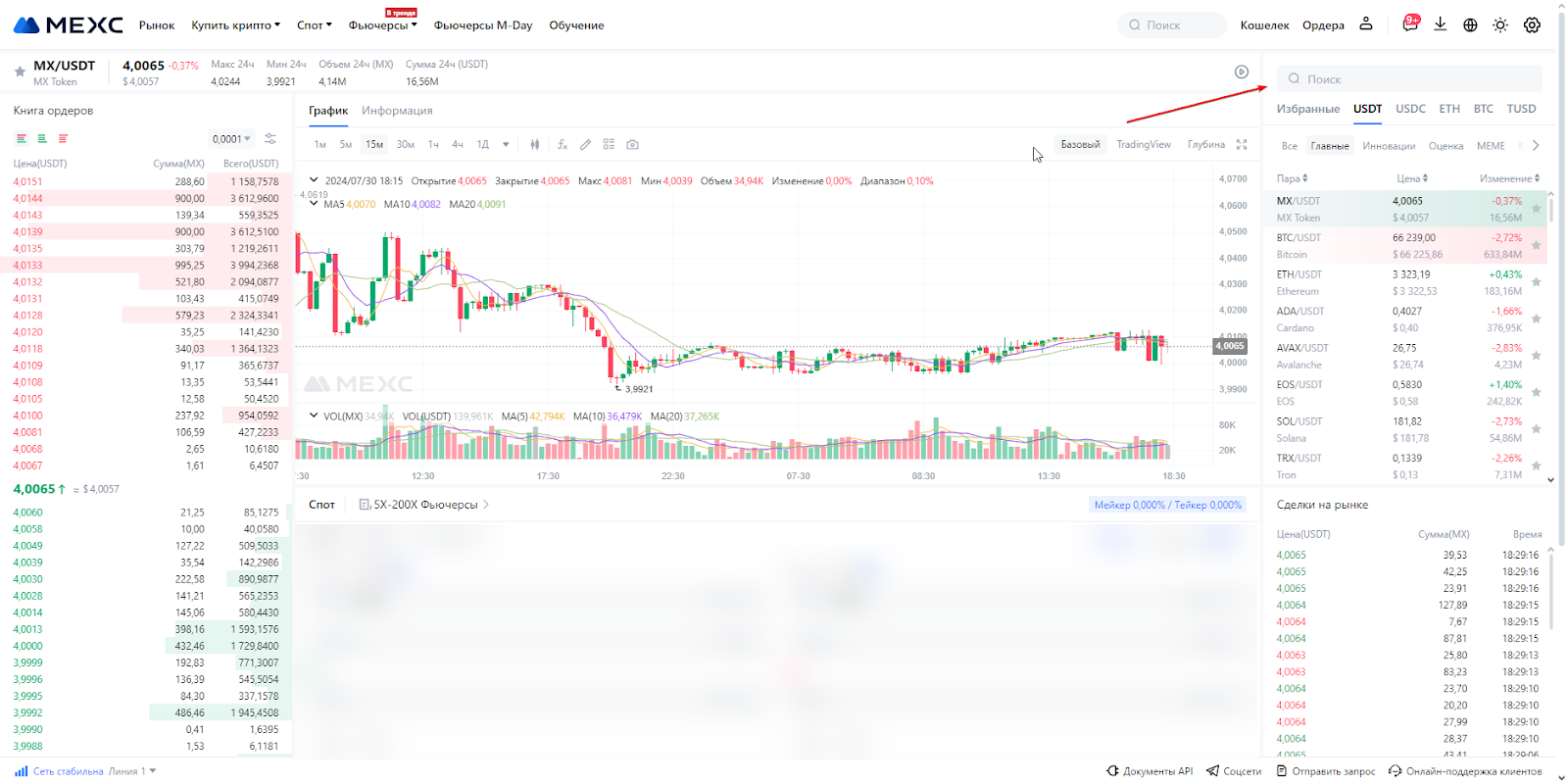
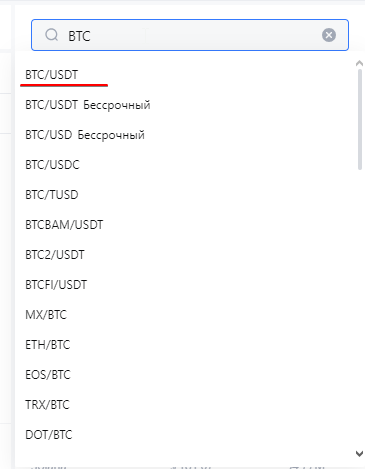
Next, just type the coin you want (e.g., BTC). Choose the BTC/USDT pair. If you want a different coin, make sure the pair looks like: coin/USDT. NEVER select “Perpetual”—that’s futures trading, and not for beginners.
You’ll see the same window, but note in the top left the pair is now BTC/USDT.
Now look at the bottom windows.
Now look at the bottom windows.
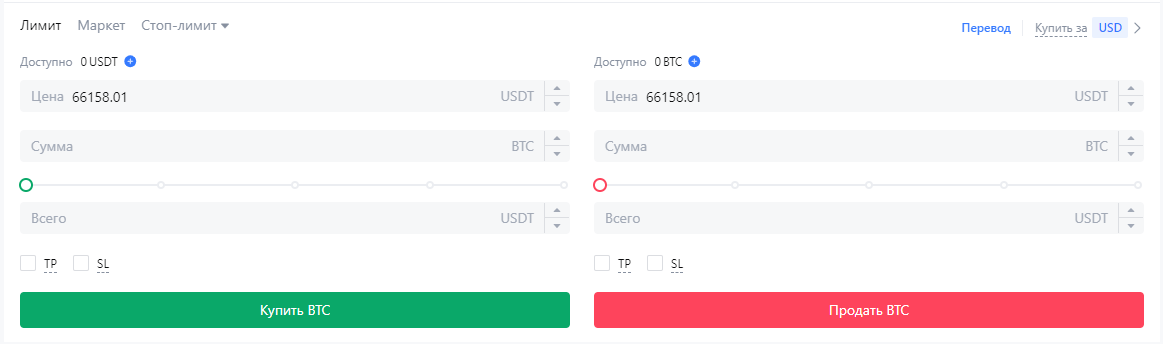
“Limit” and “Market.” “Limit” lets you set a buy order at your chosen price. For example, if you want to buy Bitcoin for $4,000 instead of $66,000, you set your desired price.
“Amount” is how much BTC you want. This field is optional—no need to complicate your calculations.
“Total” is how much USDT you want to spend. For example, if you want to buy $500 of BTC at $4,000 per coin, the exchange will auto-calculate how much BTC you’ll get. If BTC drops to $4,000, your order will be filled. If not, it will remain open.
“Amount” is how much BTC you want. This field is optional—no need to complicate your calculations.
“Total” is how much USDT you want to spend. For example, if you want to buy $500 of BTC at $4,000 per coin, the exchange will auto-calculate how much BTC you’ll get. If BTC drops to $4,000, your order will be filled. If not, it will remain open.
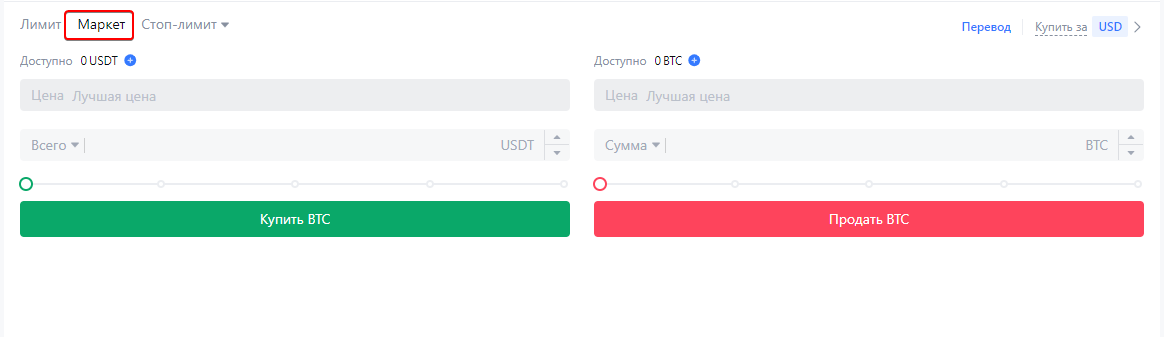
In “Market,” you buy/sell at the current price—you can only enter how much USDT you want to spend on BTC.
That’s it for buying coins. If you need recommendations on what or when to buy/sell, or have questions, contact us— t.me/saf_smm.